
This should save you ~10 minutes of reading

You can connect with our BooksMerge experts, who are available 24/7 to assist you with any tax-filing or form-related questions. You may call our experts directly using the +1-866-513-4656 this service is completely free. To schedule a callback, however, you’ll need to log in to your account or create a new one.
AI Bank Feed Categorization
Hundreds of App Integrations
Invoicing & Pay Bills
Built-in Payroll & Direct Deposit
Dedicated Mobile App
4 Paid Plans to Scale Up
Plans from $1.90/month

Free Plan for Solo Users
Multi-Currency Accounting
Real-Time Financial Reports
Inventory & Low Stock Alerts
Sage Copilot AI Assistant
Bank Reconciliation Built In
Paid Plans from $7/month
Choosing the right accounting solution is crucial for smooth business operations. QuickBooks and Xero are two of the leading cloud accounting software solutions available today. While both help businesses manage their finances efficiently, they cater to different business needs and priorities. Both platforms are designed for small businesses, startups, and growing companies.
However, QuickBooks focuses on advanced accounting and reporting, while Xero emphasizes simplicity, collaboration, and cloud-based automation. In this guide, we have provided you with a detailed breakdown of QuickBooks Vs Xero on the basis of features, pricing, users, and support quality to choose the right fit for your business.
In this blog section, let’s have a look at the comparison table of QuickBooks Vs Xero to compare the features, pricing plans, and add-ons available with both software solutions. This will help you in making the right choice according to your business needs.
| Parameter | QuickBooks | Xero |
| Best For | This accounting solution is best for small to medium-sized businesses. | This accounting solution is suitable for small businesses, startups, and growing businesses. |
| Pricing | Multiple plans with advanced features. | Pricing plans are affordable with unlimited users. |
| User Limits | Limited users according to the plans. | Unlimited users |
| Live Support | Phone, live chat, help articles, and videos are available. | No direct phone number or chat support is provided. |
| Inventory Management | Advanced inventory management features. | It is the best accounting solution for basic inventory. |
| Deployment | Desktop and online versions are available. | Only cloud-based software. |
| Payroll | Offers built-in payroll support | Payroll is only available in selected countries or through integrations. |
| Accounting Features | Provides advanced bookkeeping, invoicing, expense tracking, payroll, and inventory. | Offers bookkeeping, expense tracking, bank reconciliation, and inventory management. |
| Multi-Currency Support | Included with higher-tier editions. | Included within premium plans. |
| Industry Type | Retail, manufacturing, construction, professional services, and non-profit organizations. | Professional services, agencies, freelancers, ecommerce, and startups. |
| Customization | Creates highly customizable reports and workflows. | Moderate customization with a clean interface. |
The QuickBooks application is suitable for;
Xero is a perfect accounting solution for the following business types;
Check out the pricing plans of both QuickBooks and Xero software that will help you in making the right choice for your business based on features, users, customer support, and the features required.
Below, we have provided you with a pricing plan for QuickBooks Online 2026. The prices are subject to change and may vary by region. For the latest pricing updates, refer to the official Xero and QuickBooks websites.
| Simple Start | Essentials | Plus | Advanced | |
| Pricing | $19/mo | $37.50/mo | $57.50/mo | Advanced – $275/month |
| Users | 1 user | Up to 3 users | Up to 5 users | Up to 25 users |
| Features |
|
|
|
|
Here we have provided you with a complete breakdown of the Xero software pricing plans.
| Early | Growing | Established | |
| Pricing | $5 per month for the first 3 months
Then $25 per month |
$11 per month for the first 3 months.
Then $55 per month |
$18 per month for the first 3 months.
Then $90 per month. |
| Users | Unlimited users | Unlimited users | Unlimited users |
| Features |
|
|
|
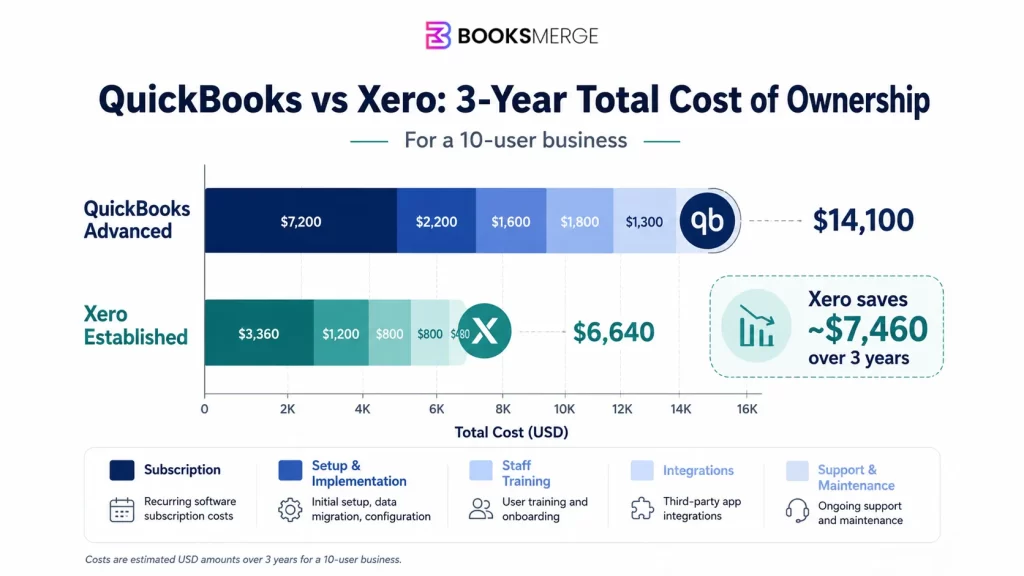
| Cost Component | QuickBooks (Advanced) | Xero (Established) |
| Monthly Subscription | $275 | $90 |
| Annual Subscription | $3,300 | $1,080 |
| 3-Year Subscription Cost | $9,900 | $3,240 |
| One-time Setup & Implementations | $1,500 | $1,000 |
| Staff Training (One-Time) | $750 | $500 |
| Third-Party Integrations (3 years) | $1,500 | $1,500 |
| Ongoing Support & Maintenance (3 Years) | $450 | $400 |
| Estimated Total Cost of Ownership (3 Years) | $14,100 | $6,640 |
As discussed above, QuickBooks and Xero are both outstanding accounting solutions, but their features may slightly vary. Below, we have described a detailed comparison of their features, which helps you determine which software aligns best with your business needs.
Accurate invoicing and accounts receivable management are important for maintaining healthy cash flow. Both accounting applications allow you to create invoices, track payments, and automate reminders, but there is a slight difference between them.
QuickBooks
QuickBooks applications help in generating customizable templates, recurring invoicing, payment reminders, and integrated online options. Moreover, you can also monitor invoice status in real-time and generate detailed aging reports to identify overdue payments.
Xero
Xero is a great accounting solution that helps users create branded invoices, schedule recurring billing, and accept online payments. Moreover, this accounting solution also helps in simplifying customer payment tracking with automatic payment reminders.
Winner:
Both of the accounting solutions provide outstanding invoicing capabilities. QuickBooks offers slightly more customization, whereas Xero offers a streamlined and automated experience.
Bank reconciliation is the most important business task that helps in tallying the business records with the bank transactions.
QuickBooks
QuickBooks automatically imports the bank transactions and uses advanced technology to categorize income and expenses. It provides a simple bank reconciliation process and provides clear audit trails to accountants and business owners.
Xero
Xero is another great accounting solution that also offers bank reconciliation features. It has an easy-to-use interface to reconcile bank transactions and create customizable bank rules.
Winner:
To handle the high volume of business transactions, businesses must opt for Xero, as it provides a faster and easier bank reconciliation process.
Inventory management is another great feature that is important for retailers, wholesalers, manufacturers, and e-commerce businesses.
QuickBooks
The QuickBooks application offers high-tier inventory management capabilities and is usually available in high-tier plans. This feature allows businesses to monitor stock levels, calculate cost of goods sold, generate purchase orders, and receive inventory alerts whenever it’s running low.
Xero
Xero accounting software provides basic inventory tracking that is perfect for small businesses. Also, you can use it to monitor stock quantities, update product information, and add inventory items directly to invoices.
Winner:
Businesses looking for extensive inventory management can take advantage of QuickBooks with more comprehensive functionality.
Maintaining an accurate financial report is important for businesses to monitor the company’s financial performance. This will help identify trends and make informed business decisions.
QuickBooks
QuickBooks helps businesses in preparing the financial statements, including cash flow statements, sales reports, expense reports, tax reports, balance sheets, accounts receivable, and accounts payable aging.
Xero
Xero also provides its users with the flexibility to create financial reports. Moreover, businesses can personalize report layouts, monitor budgets, analyze cash flow, and create detailed financial statements best suited for management and accountants.
Winner:
Xero offers better reporting capabilities, but QuickBooks provides a broader range of advanced reports and analytical tools, mainly for growing businesses.
Modern businesses now depend on multiple software programs, making integration an important consideration.
QuickBooks
You can integrate QuickBooks with 100+ popular business applications like CRM software, tax software, payroll, payment gateways, inventory management, time tracking, and eCommerce platforms. Moreover, its marketplace includes over 750 integrations to extend the software capabilities for all business sizes.
Xero
Xero is another great accounting solution that integrates with around 1000 third-party applications. Moreover, you can integrate with several cloud-based business tools, especially for companies that rely on automation.
Integration categories comprise Customer relationship management (CRM), Inventory management, Payroll solutions, Point-of-sale (POS) systems, eCommerce platforms, Expense management, Workflow automation, and Business intelligence tools.
Winner:
In comparison to QuickBooks, Xero offers greater flexibility for businesses with cloud-based accounting software.
While doing a comparison between QuickBooks Vs Xero, many businesses look at pricing, features, or integrations. However, one major factor that has the greatest impact on users is customer support.
Despite being extraordinary software, users often come across certain issues while running QuickBooks and Xero. Here comes a time when users look for software that provides the best customer assistance and saves their time.
The QuickBooks software provides different support channels to help businesses continue with their ongoing task. According to the subscription plan, users can get support via live chat, phone assistance, online resources, and a community forum.
QuickBooks support includes;
Overall Verdict: QuickBooks is known to be the best accounting suite that offers top-notch support facilities, which makes it a stronger choice for businesses that value direct assistance
Xero doesn’t provide a standard phone support facility; instead, it focuses on online ticketing, email-based assistance, and an extensive self-service help center.
Xero’s customer support facility includes
Overall Verdict: Xero’s customer support is suitable for users who are satisfied with communication and self-service resources. But businesses that opt for instant and real-time assistance prefer QuickBooks.

QuickBooks and Xero, both accounting software programs, provide customer support to help users run the program smoothly. But many businesses not only require customer support, but also look for more than technical assistance. That’s where you can choose BooksMerge and get expert assistance. You can get help in setting up a QuickBooks account, migrating data, managing ongoing business finances, and with experienced experts who can help in keeping your books of accounts up-to-date.
Note: QuickBooks Desktop Discontinued: Your Guide to Switch/Survive
QuickBooks and Xero are widely used accounting solutions. But it’s important to choose the right accounting solution that aligns with your business model, industry type, and where you operate. Here, we have described which financial software is best according to business types.
QuickBooks is the perfect fit for freelancers who require comprehensive financial solutions. It helps businesses with expense tracking, tax categorization, invoice creation and mileage logging.
Xero is a great accounting solution for freelancers who are looking for a simple accounting solution. Moreover, it also helps in automating features by reducing manual work, and unlimited users can access this software to manage their business operations.
QuickBooks provides advanced reporting, project-profitability tools, payroll management, and time-tracking integrations, which help agencies and consultants to handle their clients’ financial tasks easily.
Businesses can integrate Xero with various tools such as project management, CRM, and time-tracking. These features make it a great fit for digital agencies and consulting businesses that rely on cloud-based tools.
QuickBooks offers more advanced inventory management features, including real-time stock tracking, cost of goods sold calculations, low-stock alerts, inventory valuation, and purchase orders. This accounting solution is suitable for large-scale businesses that require advanced inventory management capabilities.
Xero also provides inventory management features that are suitable for retailers and businesses with limited inventory needs. Companies that require more complex inventory management can integrate Xero with third-party apps to enhance their inventory management experience.
QuickBooks is the perfect accounting solution that is designed to scale with growing organizations. Moreover, it provides various useful features such as inventory and project management, payroll management, custom user permissions, budgeting tools, accountant collaboration, and advanced financial reporting.
Xero is highly scalable and allows unlimited users across all subscription plans. It is a perfect fit for growing teams that require multiple employees to access the accounting system without additional user fees.
QuickBooks is the right choice for firms handling clients with complex accounting, payroll, or inventory management. Moreover, it also helps in creating detailed reports and audit trails, and makes payroll processing easier.
Xero is the best accounting solution for startups, digital agencies, and cloud-based businesses. It provides unlimited users, which helps make the business’s financial operations smoother.
Feature comparison will only help you understand which accounting solution is suitable according to your business requirements. But understanding how the software actually performs and helps bookkeepers in real time to meet their business needs is crucial.
Let’s explore what real bookkeepers commonly say about QuickBooks and Xero based on their day-to-day experience.
QuickBooks has gained immense popularity over the last few years as it is a trusted accounting solution for accounting professionals. Bookkeepers mainly suggest this software for companies dealing with complex accounting and needing advanced features. Other benefits of using QuickBooks are as follows; Reddit Discussion- https://www.reddit.com/r/Bookkeeping/
Many bookkeepers really praise QuickBooks as it helps businesses in preparing accurate financial reports. This may include cash flow statements, balance sheets, profit and loss statements, and custom financial analytics. Also, it helps businesses make the right business decisions.
Industry types such as retailers, wholesalers, and growing businesses often highlight that QuickBooks offers advanced inventory and payroll features. As a result, it eliminates the cost spent on purchasing additional software and helps simplify financial operations.
Bookkeepers mainly recommend QuickBooks to growing businesses that require more advanced accounting features.
Xero is known to be the best cloud-based software for startups, freelancers, and service-based businesses. Reddit Discussion- what is your professional opinion of xero
You can keep your finances up to date with Xero’s bank reconciliation software. This also ensures that your transactions remain accurate and you can manage your books of accounts easily. Bookkeepers often praise Xero’s bank reconciliation feature.
The best part about Xero is that it offers unlimited user access across the subscription plans. As a result, it helps the business owners, accountants, and team members to collaborate without paying any additional fees.
You can explore seamless app integrations with the Xero accounting software. Users can benefit by connecting Xero with CRM platforms, payment processors, eCommerce tools, and workflow automation.
Overall Feedback
To migrate QuickBooks to Xero, or vice versa, it is essential to understand what data can be transferred, what may require manual setup, and how to transfer data safely.
Here, we have explained the company data that you can or cannot migrate from QuickBooks to Xero.
According to the migration method or conversion tool used, you can usually transfer;
You can’t transfer some of the accounting data automatically from QuickBooks to Xero. So, you need to recreate it after the transfer i.e,
The following is the data that you can and can’t transfer from Xero to QuickBooks.
Data you can transfer
Data that requires manual setup
Steps for Migration
We hope that this blog has helped you in choosing the right accounting solution between QuickBooks Vs Xero based upon business size, accounting needs, and future growth plans. If you are looking for an accounting platform for advanced reporting capabilities and cloud-based collaboration, QuickBooks is the perfect fit. At the same time, Xero is the best software suitable for startups and small-scale businesses looking for unlimited users and easy accounting features.
Evaluate your current requirements, budget, and long-term business goals before choosing the right fit for your business between QuickBooks and Xero. For any expert’s guidance, you can connect with our Booksmerge professionals by dialing +1-866-513-4656.

QuickBooks is the perfect accounting solution for advanced inventory management, better payroll processing, and scalability. Xero mainly focuses on ease of use, unlimited users, and basic accounting tools.
Whether Xero is better than QuickBooks depends completely on your requirements. For startups, freelancers, and service-based businesses that value automation, Xero is the right choice. QuickBooks is perfect for small businesses looking for advanced reporting and detailed financial reporting.
Yes, the Xero subscription is less expensive than QuickBooks and includes unlimited users. Whereas QuickBooks is expensive and provides advanced features, but limited to a certain number of users according to plans.
Yes, you can easily migrate QuickBooks data to Xero, like charts of accounts, invoices, bills, and account balances. But you need to transfer custom reports, payroll settings, recurring transactions, and certain integrations manually.
Xero offers customer support via online tickets, email, and its help center. Unlike QuickBooks, it doesn’t offer direct phone support.
In comparison to QuickBooks, Xero is an easy-to-learn software. QuickBooks has a steeper learning curve but provides more advanced features for growing businesses.
QuickBooks is the most preferred accounting solution for US-based businesses due to its enhanced reporting capabilities, inventory management, and extensive reporting. Xero is a perfect choice for businesses that prefer collaboration and unlimited users.
No doubt that Xero offers lower prices in comparison to QuickBooks, but it may incur lower subscription fees, migration costs, staff training, integrations, and long-term business needs before switching.
QuickBooks Install Diagnostic Tool: How to Download, Run, and Fix Install Errors
Read More
AI-triaged.
Human-solved.
Instant QuickBooks diagnostics, then a certified ProAdvisor takes over live.
first-call fix
match time
live coverage