QuickBooks error PS032 usually appears while downloading or installing payroll updates, preventing QuickBooks from updating the latest payroll tax table. As a result, payroll processing may be interrupted until the issue is resolved. The error is commonly caused by problems with your payroll subscription, damaged payroll files, incorrect billing information, or an outdated QuickBooks installation.
In this guide, we’ll explain what causes QuickBooks Error PS032, the warning messages you may encounter, and the troubleshooting methods to help you resolve the error and update payroll successfully.
QuickBooks Error PS032 is a payroll update error that occurs when QuickBooks Desktop can’t verify your payroll subscription or install the latest payroll tax table. It is one of several errors in the PSXXX payroll error series, which are generally related to payroll updates, subscription validation, or payroll file issues.
| Category | Details |
| Error Code | PS032 |
| Error Type | QuickBooks Payroll Update Error |
| When It Occurs | While downloading or installing payroll updates |
| Common Error Messages |
|
| PSXXX Error Series | PS032, PS033, PS034, PS036, PS038, PS058, PS077, PS107 |
| What It Indicates | A problem with your payroll subscription, payroll setup, company file, or QuickBooks installation that prevents payroll updates from completing. |
QuickBooks Error Code PS032 may interrupt the payroll update process, preventing the latest tax tables and payroll updates from installing correctly. However, users may also encounter repeated error messages or difficulties while performing payroll-related tasks.
To fix QuickBooks error PS032, you first need to understand what’s causing it. The error is commonly linked to payroll updates, licensing, and company file issues:
Before you start troubleshooting QuickBooks Error PS032, it’s a good idea to complete a few basic checks. These steps help prevent data loss and make the troubleshooting process smoother:
Now that you know what causes QuickBooks payroll update error PS032, let’s go through the troubleshooting methods to resolve it.
An outdated or unregistered copy of QuickBooks can trigger payroll update errors like PS032. Start by updating the program and confirming your registration.


You can reactivate your QuickBooks Payroll subscription using any of the two available methods. Before you start, verify that you’re using a supported version of QuickBooks Desktop.
The easiest way to restore your payroll subscription is through your QuickBooks Desktop company file.
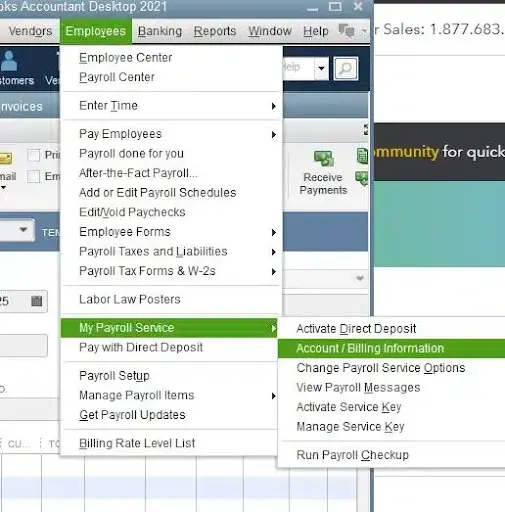
You can also restore your QuickBooks Payroll subscription by signing in to your Intuit account online.
Note: It can take up to 24 hours for your payroll subscription to be fully reactivated. Once the process is complete, the subscription status will display Active.
If your billing information doesn’t match your payroll account, QuickBooks may fail to download payroll updates. Make sure your payment details are correct before trying again.
User Account Control (UAC) can sometimes prevent QuickBooks from making the system changes needed for payroll updates. Make sure to turn off the UAC settings when downloading the QB payroll updates:

If the CPS folder contains damaged payroll files, QuickBooks may fail to install payroll updates and display error PS032. Renaming the folder allows QuickBooks to create a fresh copy automatically.

A damaged EntitlementDataStore.ecml file can also trigger QuickBooks error PS032 when updating payroll. Let’s rename the file so QuickBooks can generate a new one automatically.

Let’s run the Verify and Rebuild Data Utility to identify and repair any damage within your company file:
Run the Verify Data utility to check your company file for data damage or other issues.

Results:
If the Verify Data utility detects data damage, use the Rebuild Data tool to repair your company file. You’ll need to create a backup before the rebuild process begins.
Note: If you’re using Assisted Payroll, contact support before rebuilding your company file.

A damaged QuickBooks installation can also trigger this error. Running the built-in repair tool may help restore the program’s files and resolve the issue.
Important Note: Make sure to download and install QuickBooks Tool Hub (1.6.0.8) in the most recent version to access different utilities.
The Quick Fix my Program tool automatically closes QuickBooks background processes and runs a quick program repair to fix common issues.

If something went during the software installation or the program files are damaged, it can hamper when trying to use it. To resolve this, run the QuickBooks Install Diagnostic Tool to fix common install issues.

When none of the previous fixes work, reinstalling QuickBooks Desktop is a practical way to resolve issues caused by corrupted or missing installation files.
Before getting started
Note: If you still can’t get the license details, check the account management portal.

If you can’t find the option, simply sign out and then sign back in to Windows as an admin (or a user with admin rights).
Once you removed QuickBooks Desktop successfully, you will need to install the software again. QuickBooks will automatically install new folders and rename the old ones while reinstalling.
Important Note: If you’re planning to install or transfer QuickBooks Desktop to a different computer, you can use the Migrator Tool to complete the process.

While you can’t prevent every payroll error, a few simple practices can reduce the chances of running into error PS032 in the future.
Most cases of QuickBooks error PS032 can be resolved by updating QuickBooks, verifying your payroll subscription, correcting your billing information, or repairing damaged payroll files. However, if you’ve completed all the troubleshooting methods and the error still appears, the issue may be related to deeper problems with your company file, Windows settings, or payroll components that aren’t easy to identify on your own.
You should also consider getting professional help if the error keeps returning after a successful payroll update, you’re unable to activate or verify your payroll subscription, or QuickBooks starts displaying additional payroll update errors. An expert can identify the root cause, prevent unnecessary changes to your company file, and help restore payroll updates without putting your accounting data at risk.
Although QuickBooks error PS032 can prevent you from downloading payroll updates, it doesn’t always indicate a serious problem. In most cases, updating QuickBooks, verifying your payroll subscription, correcting billing information, or repairing damaged payroll files will resolve the issue.
If none of these solutions work, consider contacting a QuickBooks professional to diagnose the problem and get your payroll back on track. Dial +1-866-513-4656 now!

QuickBooks error PS032 usually appears when the software can’t verify your payroll subscription or install payroll updates. This can happen because your payroll subscription is inactive, your billing information is incorrect, QuickBooks is outdated, or some payroll files have become damaged.
You can usually fix the error yourself by updating QuickBooks Desktop, checking that your payroll subscription is active, verifying your billing details, renaming the CPS folder, or running the Verify and Rebuild Data utilities. If none of these methods work, repairing or reinstalling QuickBooks may resolve the issue.
No, even though both are payroll update errors, they have different causes. Error PS032 is mostly related to payroll subscription or validation issues, while PS077 is often linked to damaged payroll files or problems downloading payroll updates.
No, as most troubleshooting steps don’t require a backup. However, if you’re going to rebuild your company file or reinstall QuickBooks, creating a backup first is the safest option, so your data stays protected.
Yes, an inactive or expired payroll subscription is one of the most common reasons for error PS032. When QuickBooks can’t verify your payroll service, it may block payroll updates until the subscription is active again.
No, you’ll need an active QuickBooks Payroll subscription to download the latest payroll updates and tax tables. Once you renew your subscription, run the payroll update again to check if the issue has been resolved.
If you’ve already updated QuickBooks but the payroll update still fails, the problem is likely somewhere else. Check whether your payroll subscription is active, your billing information is correct, and your company file or payroll components aren’t damaged.
Yes, because the error stops QuickBooks from downloading the latest payroll updates, you may not be able to process payroll correctly. It can also affect payroll tax calculations and, in some cases, delay direct deposits until the issue is fixed.
Yes, a damaged company file can sometimes trigger error PS032. If QuickBooks detects data issues, it may fail to complete payroll updates. Running the Verify Data and Rebuild Data utilities can help find and repair the damage.
AI-triaged.
Human-solved.
Instant QuickBooks diagnostics, then a certified ProAdvisor takes over live.
first-call fix
match time
live coverage